For many organizations, collaboration has become the defining purpose of the office. When employees work in the same environment as their colleagues, it creates natural opportunities for dialogue, innovation, brainstorming, and cross-collaboration between teams. Modern offices are often optimized for these critical interactions, and the need for collaboration is frequently cited as the driving force behind return-to-office mandates or changes to hybrid work policies.
But this emphasis on group work and the value of collaboration can also create frustration. If employees can’t access space with the people they need to work with—or it’s a struggle to do so—the workplace can feel like an obstacle to productivity. So how can employers ensure that their space, practices, and technologies actually promote collaboration?
In this article, we’ll cover three keys to maximizing office collaboration:
- Ensure collaboration space isn’t being wasted
- Manage your collaboration spaces more effectively
- Help groups find the space they need
Let’s begin with a common workplace problem that inhibits collaboration: wasted collaboration space.
Ensure collaboration space isn’t wasted
Sometimes the biggest obstacle to office collaboration is simply the fact that the spaces best suited for collaboration—meeting rooms, neighborhoods, and informal meeting spaces—simply aren’t available. If you don’t have enough collaborative spaces to keep up with demand, you’ll need to adjust your space allocation or acquire more space. But more often, there are other issues at play, and the collaborative space you already have would be sufficient if it were being used for its intended purpose or used more efficiently.
Prevent single occupants from reserving group spaces
Sometimes people can’t find workstations they like, or the private office they usually work from is unavailable, so they reserve a meeting room instead. Or, perhaps they really do have a meeting with colleagues, and instead of scheduling their reservation for the one hour they need, they book it for the day to prepare. In either case, the meeting room is unavailable to groups that need it, and it isn’t being used for its intended purpose.
This is an issue with your reservation process. Nobody should be able to reserve group spaces for their individual workspace. But it’s not enough to simply make this guideline a formal policy. If your technology enables it, some people will do it, and they’ll find reasons to make their circumstances an exception. Modern office reservation systems like Tango Reserve (“Reserve”) give you tight control over permissions, and can prevent this possibility by requiring multiple attendees or establishing an approval process, ensuring that your collaborative space is only used for collaboration.
Solve the “no-show” reservation problem
If a group reserves a meeting room and doesn’t show up, it still appears unavailable in your reservation system, so other groups think they can’t use it. This easily happens when people informally cancel their meeting or move it to another location without canceling it in the system. The solution to this is pretty straightforward, but a lot of reservation systems don’t support it or require check-ins. If the meeting organizer doesn’t “check in” for their meeting within a specified time, the room becomes available again to others.
Reserve supports check-ins via kiosks or QR codes, ensuring that people have to be physically present at the location they’ve reserved in order to check in. You can also configure the grace period for check-ins to be as generous or strict as you want.
“No show” reservations regularly waste your collaborative space and restrict the options available to groups. Eliminating this possibility makes your shared spaces more accessible, so more collaboration can actually happen.
Rightsize your meeting rooms
Some meeting rooms have so much unused space that they could easily allow more people to collaborate at once. Or, they may have so much extra space that they could be split into multiple smaller meeting rooms with lower capacity, enabling more groups to occupy the same space.
If your collaborative spaces are always booked, it’s worth considering the ways your existing space could facilitate more or larger groups. But which you need entirely depends on what employees are looking for. If smaller groups consistently struggle to find space together, you’ll likely want to find rooms you can split. But when there’s regular demand for dedicated space to accommodate larger groups, bigger tables and/or more chairs may be the better way to increase collaboration in your workplace.
Occupancy analytics and reservation data are helpful inputs when you’re rightsizing your conference rooms and other shared spaces, but employee feedback should play a key role in your decisions as well.
Manage your collaboration spaces more effectively
Wasted space isn’t the only issue that interferes with office collaboration. Sometimes your space management processes and office reservation system get in the way, making collaborative spaces more difficult to access or fully utilize.
Quit relying on calendar apps
Calendar apps and integrations are the simplest way for employees to reserve office resources. But they don’t provide much detail about what people are reserving, and they don’t make it easy to find space that meets specific needs. Which makes them extremely limited for space management purposes.
Overseeing the use of shared office resources is a complex enough problem to benefit from a dedicated application like Reserve.
Reserve provides employees with far more information—both high-level and granular—about your office and the reservable resources within it. (You can include images, floor plans, room configurations, requestable rooms, asset attributes, relevant policies, and more.) This makes it easier for people to find and access the ideal space for their group.
It also gives you a lot more information than a calendar app ever could. Space utilization and reservation data are collected and presented in ways that empower you to monitor your reservable space and respond to changing needs effectively.
Make meeting spaces more flexible with dynamic rooms
It’s important to have large conference rooms available, even if you rarely use them. But it’s also worth considering how these spaces should be used in between the rare periods where larger groups need to meet. You don’t want to permanently divide large rooms into multiple spaces, because sometimes you need the additional space. Instead, you can increase office collaboration by making large spaces easily reconfigurable—physically, and in your reservation system. We call these dynamic rooms.
Suppose you have a big room you use once a month, or once a quarter. You can use partitions to turn it into two or more smaller rooms for groups to use the rest of the time. Let’s call these two rooms Room A and Room B in your reservation system. When your regular meetings occur and the entire space is needed, Tango Reserve enables groups to reserve Room A+B, which prevents anyone from booking Room A or Room B. And it works the other way too—when Room A or Room B are reserved, Room A+B is unavailable.
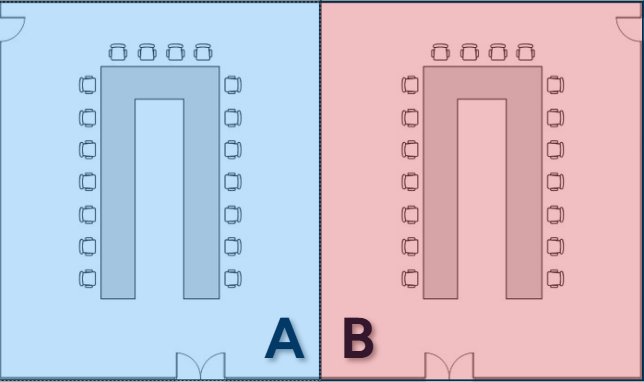
This enables your organization to get more utility out of the same space, and can help promote collaboration by ensuring that there are more usable spaces for your most common use cases.
Replicate your most popular room configurations
Even when two rooms have the same capacity and amenities, one is bound to be more popular. And different room configurations encourage different types of collaborative work. Rows of chairs may be better suited to presentations or training seminars, whereas U-shaped seating puts people on more equal footing, allowing multiple contributors to lead parts of a meeting or engage in discussion with minimal transitions.
However you configure the rooms in your workplace, make sure to regularly review how the various configurations are performing. In instances where multiple layouts serve the same purpose and can be used interchangeably in a given space, it’s worth optimizing them based on the ones that are most popular for each use case. And if a configuration is more popular because it supports more use cases or more common ones, you may want to consider refitting the lesser-used rooms with reconfigurable (or easily moveable) furniture.
Optimizing your collaborative spaces based on preferred arrangements or most common use cases increases the quality of your overall offering of spaces, as well as the availability of group space that people actually want to use. You encourage more collaboration by creating more of the space people most commonly use to work in groups.
Control access to high-value spaces with requestable rooms
Some meeting rooms are more prominent or aesthetically pleasing than others. They create a more professional impression with clients and leadership, and can add a feeling of importance other rooms simply don’t bring to the meeting. Perhaps they’re more conveniently located near the elevators or executive suites, or they have a better view.
If you have valuable space like this, part of its intended purpose may be to signify the importance of a meeting, and it should primarily be used for high value collaborative work. But that’s not always possible with typical meeting room booking software. With solutions like Reserve, however, you can make these rooms requestable. This means they’ll be visible to employees when they need to reserve space, but they can’t simply schedule time in the room. Instead, employees request a specific time, and a designated person (such as an executive or their assistant) receives a notification to approve or deny the use of the room.
At the same time, executives or other designated roles can simply reserve the room as needed when it’s available, without following the request process.
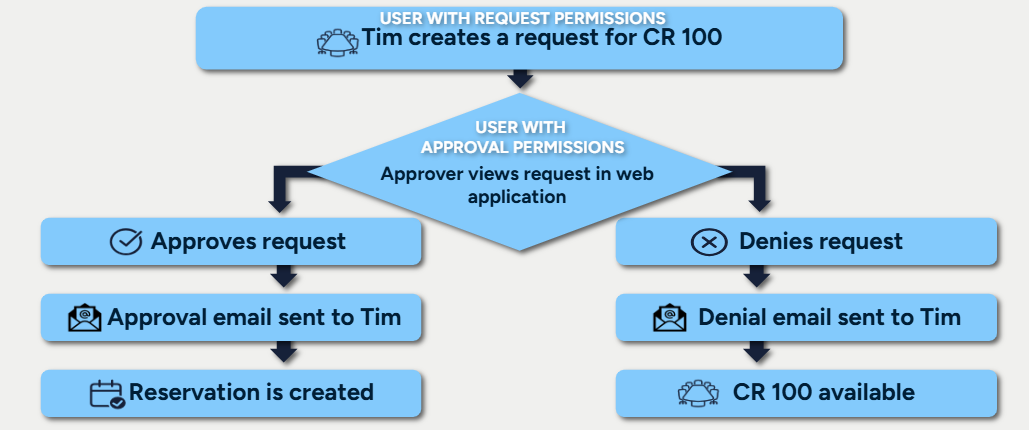
Requestable rooms help ensure that your most valuable collaborative spaces are more available for their intended purpose, such as meetings with clients or leadership. The people who need them most have better access to them, but the space is still available for general use at other times.
Use reservation types to avoid disrupting critical meetings
As scheduling conflicts arise and priorities shift, sometimes administrators or leadership need to relocate lower priority meetings, even when they aren’t the organizer. This is always disruptive to attendees, but some meetings and situations are easier to adjust than others.
Within Reserve, categorizing types of reservations can be helpful for understanding how your collaborative spaces are being used, but it’s also a simple way for meeting organizers to identify meetings that can or can’t be moved. For example, you might use a label like “VIP Meeting” or “Client Meeting” when scheduling a reservation for a high priority meeting that shouldn’t be moved, even if there’s a conflict.
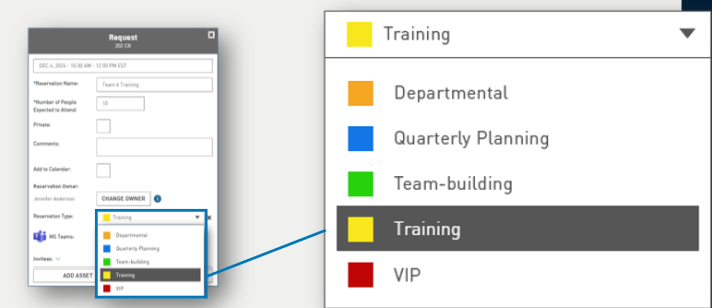
Identifying different types of meetings to signify their priority level helps prevent (or at least reduce the likelihood of) disruptions to your organization’s most important periods of collaboration.
Create “events” for complex collaboration scenarios
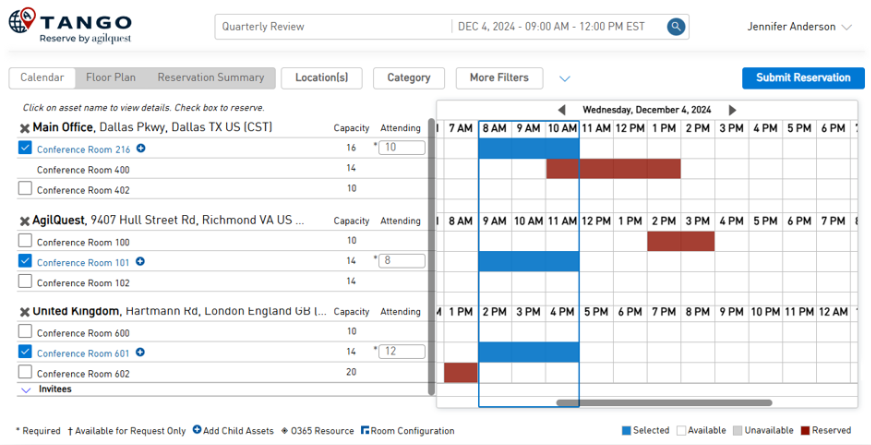
Some situations require multiple reservations throughout the day for a single collection of people. Like an all-day training, or a conference split across multiple sessions. Managing all of these reservations separately can make planning confusing. But in Reserve, you can streamline multi-phase collaborative experiences like this with “events,” which allow you to group multiple reservations into a single view.
Help groups find the space they need
It doesn’t matter how conducive your space is to collaboration or how efficiently you manage it if groups have trouble finding the right spaces. When groups reserve available space that isn’t well suited to their needs, it lowers the quality of their time together and stalls momentum. Thankfully, there are several ways to simplify the process of finding space, and set groups up for success.
Make room attributes filterable
Nobody wants to assume a meeting room has the amenities and equipment they need when they make a reservation. Every time someone books a space, they should have confidence it will meet their needs, even if they’ve never set foot in it before.
Reserve makes this possible with searchable room attributes. In Reserve, you can note each room’s capacity, amenities like projectors or video conferencing compatibility, windows, room type, floor, department, and more. When people need to reserve a space, they can simply indicate the number of attendees in their group and filter your spaces based on the details that matter to their meeting.
People shouldn’t need to coordinate with an admin or physically scout out rooms to find the right collaboration space. Filters create an intuitive, self-serve process that ensures groups will be able to make the best use of their time.

Improve visibility into preferred collaboration spaces
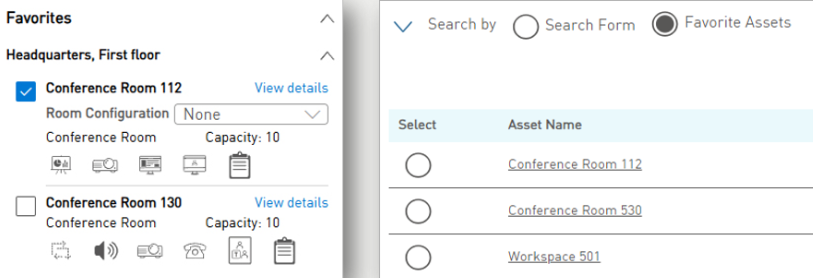
Office collaboration is more likely to happen when it’s simple and convenient. The more friction people experience when trying to schedule time with others, the more resistant they’ll be to working in groups. You can streamline this process by giving employees the power to “favorite” the rooms and resources they use the most, displaying them whenever they need to schedule meetings.
In Tango Reserve, everyone can set their own personal “Favorite Assets” based on their preferred rooms, and a “Quick Pick” view gives them faster access to these spaces from the app.
Provide automated recommendations based on schedules
Collaboration doesn’t just happen in conference rooms. And getting together with the right people is more important than getting together in the right place. But coordinating time in the office is tricky when everyone has different schedules. While teams and cohorts hunt for available space, they may have to use a variety of communication channels to find times and spaces that work for everyone.
But that doesn’t have to be the case. Quality desk booking software lets employees share their reservation schedules with trusted colleagues. When those colleagues go to make their own reservations, they can get automated recommendations for specific workstations and neighborhoods that put them near particular coworkers, on days and at times that they’ll be in the office. This removes communication barriers to collaboration, and can even stimulate collaborative work in situations where employees may have settled for independent schedules.
Communicate availability to make collaboration more accessible
It’s frustrating to feel like your team never gets “the good room.” When everyone prefers the same meeting space or neighborhood, it can create the impression that there’s not enough space, and decrease office collaboration. Employers can address this issue through occupancy analytics and proactive communication.
Instead of waiting for employees to show signs of frustration or complain to managers, employers can use occupancy analytics to see which spaces are occupied the most. If the peak occupancy levels are too high in these spaces—meaning they’re used so often that some groups are unable to reserve them—you can do two things:
- Tell people when these spaces have much lower occupancy levels, making them more available.
- Highlight alternative spaces that have similar characteristics.
Perhaps that conference room that’s always packed on Tuesdays is consistently free on Monday mornings or Friday afternoons. Some people may be happy to get together at a less popular time if it means they’re more likely to get their preferred spot. Or, maybe there’s another room people just aren’t as familiar with, but which provides all the same amenities, capabilities, and comforts.
Proactive communication can help redistribute demand throughout the week or throughout the workplace, making it easier for groups to work together.
Streamline office collaboration with Tango
Collaboration is one of the most valuable contributions your real estate makes to your operations. Your offices bring people together, so teams and groups can generate ideas, coordinate tasks, and accomplish goals that would be slow, difficult, or impossible remotely. But it’s not enough to simply have an office. You need to optimize it for collaboration, and remove the barriers that inhibit employees from working together.
Tango Reserve is a comprehensive office reservation system that was purpose-built for the modern office. In a single solution, employees have everything they need to make informed choices about where and how they work together, and leaders and administrators have the tools to control how people use the workplace.
Want to see what Tango Reserve can do for you?
Request a demo today.
